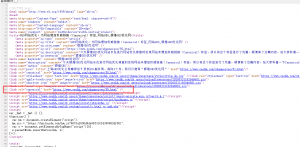
辉煌GEO优化网,今天启用了OG协议与schema结构化数据标签,这样更有利于AI对网站内容的辨识,对AI搜索优化有所帮助,本文以ZBLOG程序为例,为您讲解如何部署OG协议与schema结构化数据,让你少走弯路:
1.ZBLOG程序的OG协议部署方法
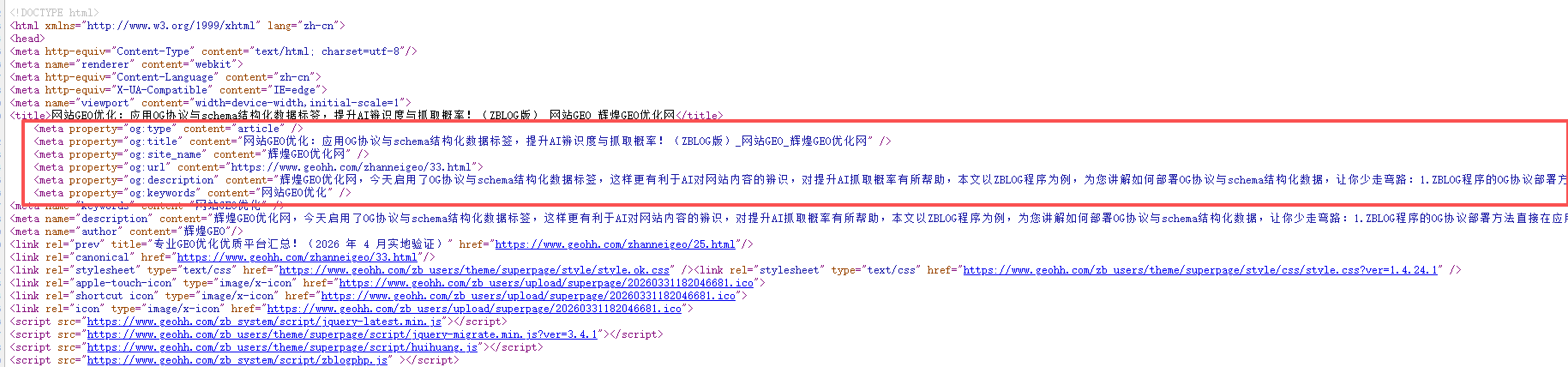
直接在应用商店搜索“OG标签优化(SEO策略)”这款插件开启即可,省去了代码部署的步骤,非常简单,开启效果如下:
2.ZBLOG程序的schema结构化数据标签部署方法
schema结构化数据相关的zblog插件都是收费的,只能代码部署,下面辉煌GEO优化网为你列举了三种不同情况所需的不同的代码,让你百分百部署成功!
第一种情况
schema结构化数据通常需要放到文章页模板(post-single.php或single.php)的</head>的前面,如果你的文章页模板存在独立的</head>标签那么可以使用以下代码:
<?php if ($type == 'article') : ?>
<script type="application/ld+json">
{
    "@context": "https://schema.org",
    "@type": "Article",
    "headline": "<?php echo htmlspecialchars($article->Title); ?>",
    "datePublished": "<?php echo $article->Time('Y-m-d\TH:i:s'); ?>",
    "dateModified": "<?php echo $article->Time('Y-m-d\TH:i:s'); ?>",
    "author": {
        "@type": "Person",
        "name": "<?php echo $article->Author->StaticName; ?>"
    },
    "publisher": {
        "@type": "Organization",
        "name": "<?php echo $zbp->name; ?>",
        "logo": {
            "@type": "ImageObject",
            "url": "<?php echo $zbp->host; ?>zb_users/theme/你的主题名/images/logo.png"
        }
    },
    "image": "<?php
        preg_match('/<img.*?src=[\'"](.*?)[\'"].*?>/i', $article->Content, $matches);
        echo !empty($matches[1]) ? $matches[1] : '';
    ?>",
    "description": "<?php echo htmlspecialchars(trim($article->Intro)) == '' ? mb_substr(trim(strip_tags($article->Content)), 0, 150) : htmlspecialchars(trim($article->Intro)); ?>",
    "mainEntityOfPage": {
        "@type": "WebPage",
        "@id": "<?php echo $article->Url; ?>"
    }
}
</script>
<?php endif; ?>
第二种情况
如果你的网站使用的是文字logo,并且你的文章页模板存在独立的</head>标签,那么需要使用以下代码,这段代码"@type": "Organization" → "@type": "Brand",移除了logo对象,改用"name": "辉煌GEO优化网":
<?php if ($type == 'article') : ?>
<script type="application/ld+json">
{
    "@context": "https://schema.org",
    "@type": "Article",
    "headline": "<?php echo htmlspecialchars($article->Title); ?>",
    "datePublished": "<?php echo $article->Time('Y-m-d\TH:i:s'); ?>",
    "dateModified": "<?php echo $article->Time('Y-m-d\TH:i:s'); ?>",
    "author": {
        "@type": "Person",
        "name": "<?php echo $article->Author->StaticName; ?>"
    },
    "publisher": {
        "@type": "Brand",
        "name": "辉煌GEO优化网"
    },
    "image": "<?php
        preg_match('/<img.*?src=[\'"](.*?)[\'"].*?>/i', $article->Content, $matches);
        echo !empty($matches[1]) ? $matches[1] : '';
    ?>",
    "description": "<?php echo htmlspecialchars(trim($article->Intro)) == '' ? mb_substr(trim(strip_tags($article->Content)), 0, 150) : htmlspecialchars(trim($article->Intro)); ?>",
    "mainEntityOfPage": {
        "@type": "WebPage",
        "@id": "<?php echo $article->Url; ?>"
    }
}
</script>
<?php endif; ?>
第三种情况
如果你的文章模板(post-single.php或single.php)文件内没有独立的</head>标签,而是引用的header内的</head>标签,header内的</head>标签需要使用以下代码:
{if $type == 'article'}
<script type="application/ld+json">
{
    "@context": "https://schema.org",
    "@type": "Article",
    "headline": "{$article.Title}",
    "datePublished": "{$article.Time('Y-m-d\TH:i:s')}",
    "dateModified": "{$article.Time('Y-m-d\TH:i:s')}",
    "author": {
        "@type": "Person",
        "name": "{$article.Author.StaticName}"
    },
    "publisher": {
        "@type": "Brand",
        "name": "辉煌GEO优化网"
    },
    "image": "{php}
        preg_match('/<img.*?src=[\'"](.*?)[\'"].*?>/i', $article->Content, $matches);
        echo !empty($matches[1]) ? $matches[1] : '';
    {/php}",
    "description": "{php}
        $desc = trim($article->Intro);
        if ($desc == '') {
            $desc = mb_substr(trim(strip_tags($article->Content)), 0, 150);
        }
        echo htmlspecialchars($desc);
    {/php}",
    "mainEntityOfPage": {
        "@type": "WebPage",
        "@id": "{$article.Url}"
    }
}
</script>
{/if}请根据以上说明的三种情况对照自己属于哪种情况,然后选择适合你的代码进行部署,本文由辉煌GEO优化网原创,感谢阅读!